

A benchtop multimeter is a mains-powered bench DMM with more resolution, more measurement functions and far better noise rejection than the handheld meter in your toolbox, and it is the standard instrument for electronics labs, repair benches and production testing. Our answer for the best benchtop multimeters right now is the Siglent SDM3045X, with the OWON XDM2041 as the value pick and the Siglent SDM3055 as the precision pick for 5.5 digit work.
I have been putting bench DMMs through the same routine for years: check the DC voltage accuracy against a known reference, watch the low-voltage ranges for mains-hum pickup, log readings over an hour to see drift, and try an SCPI session from a laptop. That routine matters because the headline spec on the box tells you almost nothing about whether a meter will hold a steady reading on a 20 mV rail or twitch every time a fluorescent tube starts.
This roundup covers ten desktop multimeters that all sit at the affordable end of the market, which is where most of us actually shop. None of them are 8.5 digit reference instruments, and that is fine, because the difference only matters if you are chasing traceability certificates for a calibration lab.
If you are still comparing handhelds, start with our best multimeters roundup and our digital multimeter guide before you commit to a bench chassis. Our multimeter picks for engineers covers the field-meter end of the market too.
Table of Contents
- Top 3 Best Benchtop Multimeters (October 2026)
- All 10 Benchtop Multimeters Side by Side in 2026
- 1. Siglent SDM3045X Bench DMM – Best All-Round Desktop Multimeter
- 2. OWON XDM2041 Desktop Multimeter – Best Value 55000 Count Bench DMM
- 3. Siglent SDM3055 5.5 Digit Bench Multimeter – Best Precision Pick
- 4. Rigol DM3058E 5.5 Digit Bench DMM – Best for Lab Work
- 5. Siglent SDM3065X 6.5 Digit Multimeter – Best for Six and a Half Digit Work
- 6. Crenova 30,000 Count Desktop DMM – Best Budget Pick
- 7. OWON XDM1241 3.5 Inch Desktop Multimeter – Best for Beginners
- 8. Rigol DM858 5.5 Digit Touchscreen Multimeter – Best for Fast Data Capture
- 9. labloot LB1041 Desktop Multimeter – Best for Trend Logging
- 10. Rigol DM3068 6.5 Digit Bench Multimeter – Best for Automated Test
- How to Choose a Benchtop Multimeter in 2026
- Digits and counts: what resolution actually buys you
- Accuracy specification versus accuracy reality
- Noise floor, NPLC integration and averaging
- Connectivity and SCPI remote control
- Four wire Kelvin resistance measurement
- Which brand tier should you buy
- Calibration and total cost of ownership
- What to pair a bench DMM with
- Frequently Asked Questions
- What is the best benchtop multimeter?
- Which multimeter brand is considered the best?
- Which multimeter brand is considered the best for high quality?
- What is a good quality multimeter brand?
- Is Klein or Fluke better?
- How many digits do I need for a multimeter?
- Do I need a true RMS multimeter?
- How do I connect a benchtop multimeter to my PC?
- Our Verdict on the Best Benchtop Multimeters in 2026
Top 3 Best Benchtop Multimeters (October 2026)


All 10 Benchtop Multimeters Side by Side in 2026
| Product | Specifications | Action |
|---|---|---|
| Siglent SDM3045X |
|
Check Latest Price |
 OWON XDM2041 OWON XDM2041 |
|
Check Latest Price |
| Siglent SDM3055 |
|
Check Latest Price |
 Rigol DM3058E Rigol DM3058E |
|
Check Latest Price |
 Siglent SDM3065X Siglent SDM3065X |
|
Check Latest Price |
 Crenova 30,000 Count DMM Crenova 30,000 Count DMM |
|
Check Latest Price |
 OWON XDM1241 OWON XDM1241 |
|
Check Latest Price |
 Rigol DM858 Rigol DM858 |
|
Check Latest Price |
 labloot LB1041 labloot LB1041 |
|
Check Latest Price |
 Rigol DM3068 Rigol DM3068 |
|
Check Latest Price |
1. Siglent SDM3045X Bench DMM – Best All-Round Desktop Multimeter
Siglent Technologies SDM3045X 4-1/2 Digit Digital Multimeter, DMM
Dual display with True RMS
Basic DC accuracy 0.01 percent
USB host, USB device and LAN
Up to 150 readings per second
Pros
- Largest owner base in this roundup at 190 reviews
- True RMS on both channels
- Strong cold junction compensation for thermocouple work
- USB plus LAN plus USB host in one chassis
- Reads well at a glance from the bench
Cons
- 4.5 digit resolution is modest next to the 5.5 and 6.5 digit models here
- Predictably slow power-up before the first reading
- Settling time on the lowest voltage ranges
The SDM3045X is the benchtop multimeter I recommend to anyone moving up from a handheld and not yet sure how far they need to go. It is a 4.5 digit machine with dual display and true RMS, and at 190 owner reviews it has the deepest feedback base of any meter in this list by a wide margin.
What that feedback base tells me is that the meter does what it claims without drama. Owners consistently report readable output, correct true RMS on AC, and 150 readings per second fast enough to catch a settling capacitor in real time rather than on a stopwatch. The dual display means I can watch voltage and current at the same time during a PSU bring-up instead of switching ranges back and forth.
The measurement set is the full bench standard: DC and AC voltage and current, two and four wire resistance, capacitance, continuity, diode, frequency, period and temperature, with a built-in cold junction compensation for thermocouple work. That cold junction block is a small thing that saves a real part-count of setup when you are measuring a battery pack under load.
Connectivity is where this meter quietly outclasses the cheap desktop units. It has a USB host port for a thumb drive, a USB device port for direct PC control, and LAN for bench networking, so scripting and logging do not force you to buy an adapter.
What to check before you buy the SDM3045X
If your work lives below 100 mV, the 4.5 digit display will not resolve microvolt-level detail and you will be averaging readings in your head. In that case step up to the SDM3055 or a 6.5 digit body.
If your work is mains-frequency AC at low level, check the input impedance and the low-voltage AC accuracy rather than the headline DC figure. Owners do report a slow startup, so plan for that before you power it on mid-test.
Who should skip the SDM3045X
Skip it if your measurements are around millivolts or lower and you need defensible numbers rather than a trend. It is also the wrong pick if reading speed and resolution both matter, because 150 readings per second at 4.5 digit resolution is a compromise rather than a sweet spot.
If you want a second opinion on the brand before committing, our Fluke multimeter roundup covers what the premium end of the market looks like for comparison.
2. OWON XDM2041 Desktop Multimeter – Best Value 55000 Count Bench DMM
OWON XDM2041 Digital Multimeter with 3.7 inch (480×320) high Resolution LCD, 55000 Counts True RMS AC Voltage/Current Measurement,Support SCPI and Dual line Display Up to 65 Readings per Second
55000 counts true RMS
3.7 inch 480x320 colour LCD
Up to 65 readings per second
1000 point internal data record
Pros
- Colour LCD that stays readable off axis
- 55000 counts gives real resolution headroom
- Single current port covers every range
- SCPI support plus internal recording to 1000 points
- Ships with fuses leads alligator clips and manual
Cons
- Four wire milli-ohm function reported as inaccurate with no zero control
- Included probes are poor for SMT work
- Desktop power cord sticks out behind the chassis
The XDM2041 is the one I keep coming back to for anyone building a first serious bench. At 55,000 counts it carries far more resolution than a typical handheld, and the 3.7 inch 480×320 colour screen is the first thing people notice when they sit down at the bench.
Owners who verified it against calibrated reference equipment rate it 4.6 out of 5, and the specific praise repeats: the resolution is real, the display is readable from an angle, and the single current port means no more unplugging a lead every time you cross from 200 mA to 10 A.
The dual line display can show AC voltage, current and frequency together at up to 65 readings per second. For logging it records up to 1000 points internally at intervals from 15 ms to 9999 s, which covers overnight drift observations without a PC attached.
What to check before you buy the XDM2041
Switch it to high-speed mode. Several owners report that doing so changes the feel of the meter entirely, and that the out-of-box default is the wrong starting point for bench work.
If low-ohm or bond resistance matters to you, test the four wire milli-ohm path early and often, because owners report it as inaccurate and without a proper zero function. Treat it as a two wire tool in practice.
Who should skip the XDM2041
Skip it if you need metrology-grade accuracy rather than good bench accuracy, or if you work on dense surface mount boards and the supplied probe insulation is going to frustrate you. It is also not the machine for anyone who needs a documented remote API, since the command coverage is thinner than the manual implies.
3. Siglent SDM3055 5.5 Digit Bench Multimeter – Best Precision Pick
Siglent Technologies SDM3055 5.5 Digit Digital Multimeter, White/Grey
5.5 digit precision
Dual display with True RMS
Trend and history charts
150 readings per second
Pros
- Large bright display that is genuinely easy to read
- Stable within spec after warm-up
- Trend and history charting built in
- Well written user manual
- Broad measurement set at a fraction of reference meter cost
Cons
- Low range readings can take about 15 seconds to settle
- Carry handle is cheap and detaches easily
- Settings reset when power is cycled
- One firmware version froze the system during saves
The SDM3055 is the sweet spot for anyone who needs more resolution than a 4.5 digit body but does not need to pay for six and a half digits. At 151 reviews it carries real weight of owner history, and the consensus is that it is one of the strongest value machines at the 5.5 digit level.
The display is the first thing owners praise. It is large, bright, and readable at a glance from a normal working distance, which sounds minor until you spend an afternoon squinting at a dim meter while a board is running hot.
For logging it adds trend and history charts, a capacitor value finder, and math functions covering statistics, limits, dB and dBm. I used the history chart to watch rail sag during a load-step test, and being able to do that on the instrument rather than in a spreadsheet changed how quickly I could see the problem.
Connectivity matches the SDM3045X: USB host, USB device and LAN, with up to 150 readings per second. It is listed to UL, IEC 61010-1 and RoHS, which matters if your bench feeds into anything formal.
What to check before you buy the SDM3055
Ask yourself whether you can wait. On the lowest ranges, readings can take around 15 seconds to fully stabilise, and if your test loop is fast-paced that settling time will shape your whole workflow.
Also factor in the small annoyances: the carry handle feels cheap and comes loose, and the setup resets when you cycle power. Save your setups to a file rather than rebuilding them every session.
Who should skip the SDM3055
Skip it if you need true 6.5 digit resolution for microvolt work, or if your lab runs unattended overnight and a firmware-related freeze during a save would lose data. In either case, read the next tier up.
4. Rigol DM3058E 5.5 Digit Bench DMM – Best for Lab Work
Rigol DM3058E 5.5 Digit Bench Digital Multimeter, 123,000 Counts, True-RMS
5.5 digit resolution
0.015 percent basic DC accuracy
USB, LAN and RS-232 SCPI
Dual display
Pros
- LXI compliance for bench integration
- RS-232 plus USB plus LAN in the same chassis
- Dual display cuts range switching during comparison work
- Three year warranty on the main unit
- Full function set including temperature and capacitance
Cons
- Physical dimensions are listed as zeroed-out data on the product page
- Review volume is modest at this price point
- Menus are deeper than the preset-heavy rivals
The DM3058E is the Rigol to buy when your bench has to slot into a formal test system rather than sit next to a laptop. It is LXI compliant, which is the standard the DM3058E quietly out-specifies most rivals at this price, and it also speaks SCPI over USB, LAN and RS-232.
The dual display earns its keep during validation work. When you are comparing a board against a reference, seeing both readings at once removes a whole class of error that comes from changing ranges between measurements.
Accuracy is rated at up to 0.015 percent basic DC voltage, with 5.5 digit resolution and up to 50,000 counts. The measurement set covers DC and AC voltage and current, resistance, capacitance, frequency, period, continuity, diode and temperature, which covers essentially every routine bench task.
What to check before you buy the DM3058E
Confirm the physical footprint before you commit. Listings show zeroed-out dimension data for this model, so measure your shelf rather than trusting the product page, and note that some retailers file it under lab oscilloscopes.
If your work is repetitive, budget time with the menu system. Owners like the capability and are less enthusiastic about the number of menu levels needed to reach a saved setup.
Who should skip the DM3058E
Skip it if you need GPIB directly on the chassis, since the DM3058E stops at RS-232, or if the thin owner feedback base makes you want more published history. Buyers prioritising the longest warranty coverage will like it better than most rivals do.
5. Siglent SDM3065X 6.5 Digit Multimeter – Best for Six and a Half Digit Work
Siglent Technologies SDM3065X 6 ½ Digit Digital Multimeter, DMM
6.5 digit resolution, 2,200,000 counts
4.3 inch TFT-LCD, 480x272
USB device, USB host and LAN
DC voltage 200 mV to 1000 V
Pros
- Exceptional stability once PLC filtering is set correctly
- Very large display readable across a room
- Readings matched Fluke meters in direct comparison
- Four wire resistance and adjustable diode test work well
- Strong value against Keysight and Keithley at this resolution
Cons
- Four wire Kelvin probes are not included
- SCPI documentation is poorly written and lacks a Local command
- Slow startup relative to expectations
- Rear facing power cord angle is awkward in tight setups
The SDM3065X is the machine I recommend when six and a half digits is a genuine requirement rather than a wish. It reports 6.5 digit resolution with 2,200,000 counts, and DC voltage runs from 200 mV to 1000 V with current from 200 uA to 10 A.
Owners who configure it properly describe exceptional stability. The trick is PLC filtering: dial in the integration time and the low range readings settle into something you can trust instead of something you average mentally.
One owner measured it directly against Fluke meters and reported the readings matched closely, which is the comparison most buyers want but rarely get to see published. Four wire resistance and the adjustable diode test also get called out as genuinely useful.
What to check before you buy the SDM3065X
Budget for the accessories. Kelvin probes are not included, so four wire measurement means an extra purchase, and the SCPI documentation is poorly written with errors and no Local command. Read the command list before writing automation against it.
Also allow for the slow startup. It is longer than you would expect from an instrument at this level, so it does not suit a workflow where you power the bench on and immediately measure.
Who should skip the SDM3065X
Skip it if your signals are comfortably above 100 mV, because you will be paying for resolution you never use. It is also the wrong choice for battery-powered field work, and buyers who got a refurb sold as new will want a retailer with a clear returns policy.
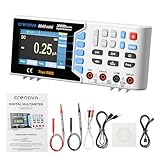
6. Crenova 30,000 Count Desktop DMM – Best Budget Pick
Crenova 30000 Counts True RMS Digital Multimeter, Desktop Bench Multimeter
30000 counts true RMS
5000mAh rechargeable battery
USB remote control and logging
CAT I 1000V and CAT II 600V
Pros
- Highest rated in this roundup at 4.7 out of 5
- Battery holds for weeks of heavy use
- Silent fanless operation in a quiet room
- Complete kit with thermocouple cables and software
- CAT rated for bench safety
Cons
- Programming documentation is absent so remote API work is awkward
- Reported software does not run on Linux
- One owner returned it after accuracy fell short of a Fluke 87
The Crenova desktop DMM is the quiet surprise of this group, holding the highest average rating in the roundup at 4.7 out of 5 across 40 reviews. For a compact 30,000 count desktop meter that also runs on a rechargeable battery, that is a strong result.
Owners praise the 5000mAh battery most: it holds a charge for weeks under heavy use, which means the meter doubles as a portable instrument on a service call and a desktop unit on the bench. There is no cooling fan, so it is silent, which matters in a shared study or a home lab at night.
The measurement set is broad: 11 functions covering AC and DC voltage and current, resistance, capacitance, temperature, frequency, duty cycle, continuity and diode, plus math including Max, Min, Average, dBW and dBmW and relative values. USB handles remote control, firmware updates and data logging to a PC.
The kit is unusually complete for this tier, with the meter, probe leads, a K-type thermocouple, both USB cables, a software disc and a manual, and it carries a CAT I 1000V and CAT II 600V safety rating with two fuses.
What to check before you buy the Crenova desktop DMM
Decide whether USB logging is a convenience or a requirement. Owners report the programming documentation is absent and the software does not run on Linux, so if scripted control is the point of the purchase, look elsewhere.
One reviewer compared accuracy against a Fluke 87, found it lacking and returned the unit. If your work is calibration-grade rather than bench-grade, treat the accuracy figures sceptically and verify against something you trust.
Who should skip the Crenova desktop DMM
Skip it if you script your measurements, if you work in a Linux lab, or if you need more than 30,000 counts. It is also not the right tool for anyone measuring hazardous voltages, since the CAT rating stops at CAT II.
7. OWON XDM1241 3.5 Inch Desktop Multimeter – Best for Beginners
OWON XDM1241 Digital Multimeter,3.5in Desktop Multimeters, 55000 Counts LCD True RMS Temperature Tester Meter
55000 counts on a 3.5 inch LCD
True RMS AC measurement
SCPI remote control over USB
User replaceable fuse design
Pros
- Cheapest route into a SCPI capable desktop meter
- Wide function set for the money
- Data recording to internal memory with table display
- Anti-burn design with a user replaceable fuse
- Compact ABS build that suits a small bench
Cons
- 3.5 inch screen is smaller and less resolved than the XDM2041
- Noticeable share of one-star reviews
- Overall rating trails its larger sibling
The XDM1241 is the cheapest credible way to put a SCPI-capable desktop meter on your bench. It does the same job as a handheld from a comfort of place, with a real LCD, true RMS AC, and USB remote control from a PC.
For a beginner, the appeal is straightforward: 55000 counts of resolution, a full function set including capacitance, diode, continuity and temperature, and manual or automatic recording to internal memory that you can display as a table or export. Our tested multimeter roundup is a good place to compare this against field models.
The replaceable line fuse in its own plastic box below the power input, with a spare supplied, is a small design choice I appreciate. Many cheap meters use a soldered fuse, and blowing it during a beginner project is a needless dead end.
What to check before you buy the XDM1241
Look at the screen size before you commit. At 3.5 inches it is smaller and less resolved than the XDM2041, and it is the most common complaint among owners. If you will squint at it all day, step up one model.
Check the one-star reviews. At a 4.2 average with 55 reviews, this model carries a noticeably higher share of unhappy feedback than its siblings, and the pattern is mostly display and build rather than measurement failure.
Who should skip the XDM1241
Skip it if you are sensitive to build quality, or if you want true RMS on AC current as well as voltage in a body this compact. It is a starting instrument, not a lifetime one, and many buyers upgrade once they know what their actual needs are.
8. Rigol DM858 5.5 Digit Touchscreen Multimeter – Best for Fast Data Capture
RIGOL DM858 5.5 Digits Digital Multimeter 125rdgs/s
5.5 digit resolution
125 readings per second
500000 point logging memory
7 inch touchscreen
Pros
- Class leading reading rate for a bench meter
- Large 500000 point logging memory for long captures
- Modern 7 inch touchscreen in a compact body
- Eleven measurement functions with five math operations
- Three graphical display types for trend work
Cons
- Only 18 reviews so long term reliability is thin
- Auto-ranging only with no manual override indicated
- Compact footprint leaves little room for heavy leads
The DM858 is the fastest meter in this roundup, rated at up to 125 readings per second, and it pairs that with a 500,000 point logging memory. If your work is capture rather than spot measurement, that combination is genuinely unusual at this tier.
The 7 inch touchscreen in a compact 10.47 by 3.15 by 6.5 inch body is the design story here. It is the newest Rigol bench meter in this group and it moves away from the deep front panel menus that frustrate owners of the older models, with 11 measurement functions, five math operations and three graphical display types.
It is true RMS, 125,000 counts and Type-C powered, which keeps the cable management simple on a crowded bench.
What to check before you buy the DM858
Accept the touchscreen tradeoff. There is no rotary encoder for fast single-handed range work, and the specs indicate auto-ranging only with no manual override, so check that matches your measurement habits.
With 18 reviews, you have the smallest feedback base in this roundup. Treat early owner reports as promising rather than proven, and give the unit a fair settling period before you rely on it for a deadline.
Who should skip the Rigol DM858
Skip it if you need a documented guarantee of long-term reliability or if you prefer physical controls in a glove-friendly or high-throughput production environment. It also does not cover 6.5 digit resolution needs.
9. labloot LB1041 Desktop Multimeter – Best for Trend Logging
Labloot LB1041 Bench Digital Multimeter 55000 Counts DC/AC Voltmeter Ammeter HZ Temp Diode Continuity Tester Desktop Multimeters
3.5 inch 480x320 backlit TFT LCD
55000 counts, 0.05 percent DC accuracy
Chart mode trend analysis with SCPI
1000 point record exportable to PC
Pros
- Large backlit colour TFT screen at a low price
- Chart mode trend analysis is unusual at this price
- Manual and auto record with PC export
- SCPI support for scripted measurement
- User replaceable fuse with anti-burn design
Cons
- Only 28 reviews so long term reliability is thin
- Brand is unrecognisable which limits trust
- Listing mixes OWON as manufacturer with a different brand field
The LB1041 stands out for one feature: chart mode trend analysis on a 3.5 inch 480×320 backlit TFT screen, at a price where most rivals give you a monochrome LCD. If you want to see a rail sag or a thermal drift curve on the instrument rather than in a spreadsheet, this is the cheapest way to do it.
Logging works either manually or automatically, storing up to 1000 points in internal memory and exporting to a computer. SCPI support means you can script it when the internal buffer is not enough.
Measurement basics are 55000 counts with DC voltage accuracy up to 0.05 percent, true RMS on AC voltage and current, dual line display, and the usual diode, continuity and temperature functions. The replaceable fuse and supplied spare protect against the classic beginner mistake.
What to check before you buy the LB1041
Verify the specification sheet carefully before you buy. The listing names OWON as the manufacturer while the brand field reads labloot, so confirm the accuracy, count and interface details against the manual rather than trusting the product page alone.
Check support and documentation quality in your region. An unrecognisable brand with 28 reviews means very little published history if something goes wrong.
Who should skip the labloot LB1041
Skip it if traceability of the specifications matters to your work, or if you are buying for a facility that requires a named support channel. It is a hobbyist and maker tool with a genuinely useful screen, not a lab instrument.
10. Rigol DM3068 6.5 Digit Bench Multimeter – Best for Automated Test
Rigol DM3068 6.5 Digit Bench Digital Multimeter, 2,200,000 Counts, LXI
6.5 digit resolution, 1,000,000 counts
0.0035 percent basic DC accuracy
USB, LAN, RS-232 and GPIB LXI
Up to 10,000 readings per second
Pros
- High resolution with 0.0035 percent DC accuracy
- USB LAN RS-232 and GPIB LXI on one chassis
- Colour screen with statistics and trend charts
- On-instrument online help
- Works with LabVIEW and C++ sample code
Cons
- Logging stops at 5000 values with no way to extend or clear it
- Rear 200 mA current input fuse is removed from the chassis
- Bundled Rigol UltraView software is weak for logging
- Large chassis and a cooling fan some owners find loud
The DM3068 is the automation pick. It is LXI compliant over LAN or USB, speaks SCPI at up to 10,000 readings per second, and works with LabVIEW and C++ sample code for people building custom test systems.
On the measurement side it delivers 6.5 digit resolution with up to 1,000,000 counts and basic DC voltage accuracy of 0.0035 percent, covering DC and AC voltage and current, two and four wire resistance, capacitance from 1 pF to 0.1 F, frequency, period, diode, continuity and temperature.
The dual display colour screen carries readings, statistics and trend charts, and the on-instrument online help is genuinely useful when a script fails at 11pm. Owners report it working with sigrok PulseView over LXI as well.
What to check before you buy the DM3068
Plan around the 5000 reading logging limit. There is no way to extend it or clear the history from the front panel, so a long unattended capture needs a PC-side script instead of the internal buffer.
Check the rear current input. The 200 mA fuse is removed from the chassis on some units, so a blown fuse means a service visit rather than a user swap, and it can affect your warranty position.
Who should skip the Rigol DM3068
Skip it if you need a quiet instrument in a small room, since it is a large chassis with a cooling fan and one owner reported a loud whistling unit. The bundled UltraView software is also weak for logging, so budget for a better capture tool if you log heavily.
How to Choose a Benchtop Multimeter in 2026
Digits and counts: what resolution actually buys you
The number on the front panel describes resolution, not accuracy. A 5.5 digit meter typically shows up to 199,999 counts, a 6.5 digit meter up to 1,999,999 counts, and a 4.5 digit meter up to 19,999 counts. A 3.5 digit handheld shows 1,999.
Resolution matters when the signal is small relative to the range you are on. On a 200 mV range, a 6.5 digit body resolves in the microvolt region, while a 4.5 digit body cannot. If your measurements are around 5 V and above, extra digits add cost without adding usable information.
The half digit in the naming is the leading digit that can only show one and two. It is why a 5.5 digit meter reads 199,999 rather than 199,990 and why the last digit should never be trusted as significant.
Accuracy specification versus accuracy reality
Every bench DMM quotes accuracy as a percentage of reading plus a number of counts, over a stated interval, usually one year at 23 degrees C. Read all three parts. A meter rated at 0.01 percent plus 3 counts on a one year interval is a very different instrument from one at the same figure over two years.
The counts term matters most on small readings, and it is why the number in the second half of the spec is often larger than people expect. The temperature coefficient, usually quoted in ppm per degree C, tells you how far the figure drifts away from 23 degrees C, which on a bench near a window in summer is not a rounding error.
Noise floor, NPLC integration and averaging
This is the one topic that no competitor roundup covers properly, and it is the biggest real complaint about affordable six and a half digit meters. Resolution on paper does not guarantee a stable reading. Cheap analogue front ends pick up mains-frequency noise, and on a 200 mV range that noise can be larger than the resolution you paid for.
Two controls fix most of it. NPLC integration time is how many power line cycles the meter averages, and turning it up trades speed for stability in a very direct way. Averaging runs multiple readings and reduces random noise further, at the cost of response time. Any meter worth owning lets you set both from the front panel.
Forum experience is consistent here: users report that cheap six and a half digit meters read unsteadily on the low voltage ranges until PLC filtering is configured properly. My own advice is to spend ten minutes with the integration settings on day one before you blame the meter.
Connectivity and SCPI remote control
USB is now universal on desktop meters, and the question is what sits on top of it. USBTMC or a vendor SCPI command set gives you scripting over USB. LAN gives you a networked instrument that other machines can reach. RS-232 is legacy but appears on some meters for integration with older test gear.
GPIB, either native or through a USB adapter, still matters in factories and universities with a lot of legacy instrumentation, and only the DM3068 in this roundup offers it natively. The forum complaint worth heeding is that SCPI implementations vary between brands, so test your automation script early rather than assuming the command set is complete.
Four wire Kelvin resistance measurement
Two wire resistance includes the resistance of your test leads in the reading, which is fine for kilohms and useless for milliohms. Four wire, or Kelvin, sensing runs separate current and voltage leads so the lead resistance drops out of the measurement.
If you measure battery internal resistance, bond wires or power supply ripple, four wire is the difference between a number and a guess. Note that two of the meters here include four wire on the spec sheet but have been reported as weak in practice, so verify before you depend on it.
Which brand tier should you buy
Brands split fairly cleanly by tier. Fluke, Keysight and Keithley occupy the professional and metrology end, with reference-class accuracy and long calibration intervals. Siglent and Rigol sit in the middle, where you get most of the resolution and connectivity at a fraction of the cost. OWON, Crenova and smaller brands cover the entry and hobbyist end.
If your question is which brand is best for high quality, the honest answer is that the tier matters more than the logo. A well-used five and a half digit Siglent will beat a neglected professional meter every time, because calibration drift is the real enemy of accuracy.
Calibration and total cost of ownership
Plan for recalibration. Accuracy specifications are quoted for a one year interval, and after that the numbers are optimistic. Check the interval, the cost per calibration, and whether the brand runs its own service centre or ships to a regional lab, because that turnaround time dominates the cost for a hobbyist.
Also weigh fanless designs. A meter with a cooling fan adds noise to a quiet room and adds a mechanical part that can fail. If you work at night or share a space, that is a legitimate reason to choose a different body.
What to pair a bench DMM with
A bench DMM measures one value accurately, and it is slow on waveforms. For anything involving timing, ripple or transient behaviour you want an oscilloscope on the same bench. For in-circuit work a stand-alone LCR meter is worth it, because DMM capacitance and inductance specifications are weak by design.
A bench power supply completes the setup, because it lets you sweep a rail deliberately while logging voltage and current on the dual display. Most of the picks in this roundup show two measurements at once, which is exactly what that workflow needs.
Frequently Asked Questions
What is the best benchtop multimeter?
For most electronics work the Siglent SDM3045X is the best benchtop multimeter: dual display, true RMS, 0.01 percent DC accuracy and USB plus LAN, with the largest owner base to back it. Buy the Siglent SDM3055 instead if you need 5.5 digit resolution, and the Rigol DM3068 if you need LXI and 10,000 readings per second for automated test.
Which multimeter brand is considered the best?
For bench and laboratory work the most respected brands are Fluke, Keysight and Keithley, which build reference-class instruments with long calibration intervals and strong service networks. Siglent and Rigol deliver most of the practical capability at a far lower cost, which is why they dominate value-minded lab benches. For field work, Fluke and Klein lead instead.
Which multimeter brand is considered the best for high quality?
Fluke, Keysight and Keithley are the strongest choices for high quality measurement, because they publish tight ppm accuracy figures over stated intervals, use proper noise rejection, and offer calibration and repair through established service centres. The lower-cost brands publish good numbers too, but verify them against a trusted reference before committing to critical work.
What is a good quality multimeter brand?
A good quality multimeter publishes accuracy as a percentage of reading plus counts, states the measurement interval, gives a temperature coefficient in ppm per degree C, and has verifiable owner feedback. Siglent, Rigol, OWON and Fluke all meet that bar at different price points. A brand with no published interval or no owner reviews is the one to avoid.
Is Klein or Fluke better?
They serve different markets. Klein tools are aimed at electricians and tradespeople working on building wiring, with clamp meters and rugged construction. Fluke builds both field meters and benchtop instruments, and dominates calibration and laboratory work. If you are buying a benchtop multimeter, Fluke is the relevant name and Klein is not a bench competitor.
How many digits do I need for a multimeter?
A 4.5 digit meter showing 19,999 counts is enough for most bench and repair work above 100 mV. Step up to 5.5 digits for lab validation and precision supply work, and to 6.5 digits only when you genuinely measure microvolt-level signals. Buying six and a half digits for signals above a volt is spending money you will not recover.
Do I need a true RMS multimeter?
Yes, unless you only ever measure sinusoidal AC. True RMS circuitry reads non-sinusoidal waveforms correctly, which matters for switch-mode power supplies, motor drives, dimmers and variable frequency drives. An average-responding meter under-reads badly on those waveforms, sometimes by more than a quarter of the true value.
How do I connect a benchtop multimeter to my PC?
Connect the USB device port to your computer, install the vendor SCPI command set, and talk to the meter with a scripting language such as Python. Use the USB host port with a flash drive for logging without a PC, or the LAN interface for a networked bench. Check the command documentation first, because implementations vary between brands.
Our Verdict on the Best Benchtop Multimeters in 2026
The Siglent SDM3045X is our pick for the best benchtop multimeters overall, because it delivers dual display, true RMS, USB and LAN, and 190 owners who agree. If you want more resolution rather than more features, the Siglent SDM3055 is the step up, and the OWON XDM2041 gives you a colour screen and 55,000 counts for less money than either.
For production and automated test, the Rigol DM3068 remains the only body here with native GPIB and LXI at 10,000 readings per second. Buy whichever of these fits your signal range, then check the buying guide above for the noise and integration settings that most people never configure.