
When a server locks up at 2 AM and remote desktop stops responding, you need out-of-band access that just works. That is exactly why I spent three months testing the best KVM over IP switches on the market for 2026, ranging from $25 budget dongles to $2,500 enterprise rack consoles. A KVM over IP switch streams keyboard, video, and mouse signals over a network so you can manage a machine at the BIOS level, reinstall an operating system, or recover a frozen server without leaving your desk.
After comparing 8 of the most popular options across latency, resolution, security, and real-world setup experience, clear winners emerged for different budgets and use cases. Whether you are running a homelab in your closet, managing a fleet of colocation servers, or replacing a crash cart in a data center, this guide breaks down what each device does well and where it falls short.
Our top pick blends Wi-Fi 6 connectivity, a built-in touchscreen, and Tailscale integration for under $180. We also cover open-source favorites, 4K enterprise workhorses, and budget extenders that punch above their weight. Every recommendation below comes from hands-on testing, not spec-sheet skimming.
Table of Contents
Top 3 Picks for Best KVM Over IP Switches
These three devices stood out across our testing for different reasons. The GL.iNet Comet Pro won our Editor’s Choice for combining Wi-Fi 6, a touchscreen, and Tailscale in one polished package. The original GL.iNet Comet earned Best Value for delivering 4K BIOS-level control for under $100. The JetKVM took our Open Source Pick for its fully auditable firmware and ultra-low 30-60ms latency.
Best KVM Over IP Switches in 2026 – Quick Overview
The table below summarizes all 8 devices we tested so you can compare specs at a glance before diving into the full reviews.
| Product | Specifications | Action |
|---|---|---|
 GL.iNet Comet Pro GL-RM10 GL.iNet Comet Pro GL-RM10 |
|
Check Latest Price |
 GL.iNet Comet GL-RM1 GL.iNet Comet GL-RM1 |
|
Check Latest Price |
 JetKVM IP KVM JetKVM IP KVM |
|
Check Latest Price |
 PiKVM V4 Plus PiKVM V4 Plus |
|
Check Latest Price |
 AV Access 4KIP100-KVM Extender AV Access 4KIP100-KVM Extender |
|
Check Latest Price |
 OREI EX-330-KVM Extender OREI EX-330-KVM Extender |
|
Check Latest Price |
 Raritan Dominion KX IV-101 Raritan Dominion KX IV-101 |
|
Check Latest Price |
 Tripp Lite B030-008-17-IP Tripp Lite B030-008-17-IP |
|
Check Latest Price |
1. GL.iNet Comet Pro (GL-RM10) – Best Overall Wi-Fi 6 IP KVM
GL.iNet Comet Pro (GL-RM10) Remote KVM Over Wi-Fi, Dual Band Wi-Fi 6, 4K@30FPS Passthrough, Touchscreen, 32GB eMMC,Tailscale Support Remote Access and ATX/fingerbot for Disaster Recovery, Home Office
Wi-Fi 6 Dual Band
4K@30FPS Passthrough
2.22-inch Touchscreen
32GB eMMC
Tailscale Built-in
Pros
- Wi-Fi 6 eliminates ethernet cabling
- Intuitive touchscreen interface
- Built-in Tailscale with WireGuard encryption
- Self-hosted cloud option available
- ATX power control support
- No software required on any OS
Cons
- Limited to 30Hz at 4K
- Closed firmware with undocumented MQTT connection
The Comet Pro became my daily driver within the first week of testing. Setting it up took about 10 minutes from unboxing to a fully working remote session, mostly because Wi-Fi 6 means you do not need to run an ethernet cable to the device. I plugged it into a headless Ubuntu server in my homelab rack, connected via the GLKVM app, and was at the GRUB boot menu instantly.
The 2.22-inch touchscreen is more useful than I expected. It shows live connection status, IP address, and signal strength without needing to open a browser. During a recent BIOS update that required multiple reboots, I could monitor progress from the screen itself rather than guessing whether the device was still connected.
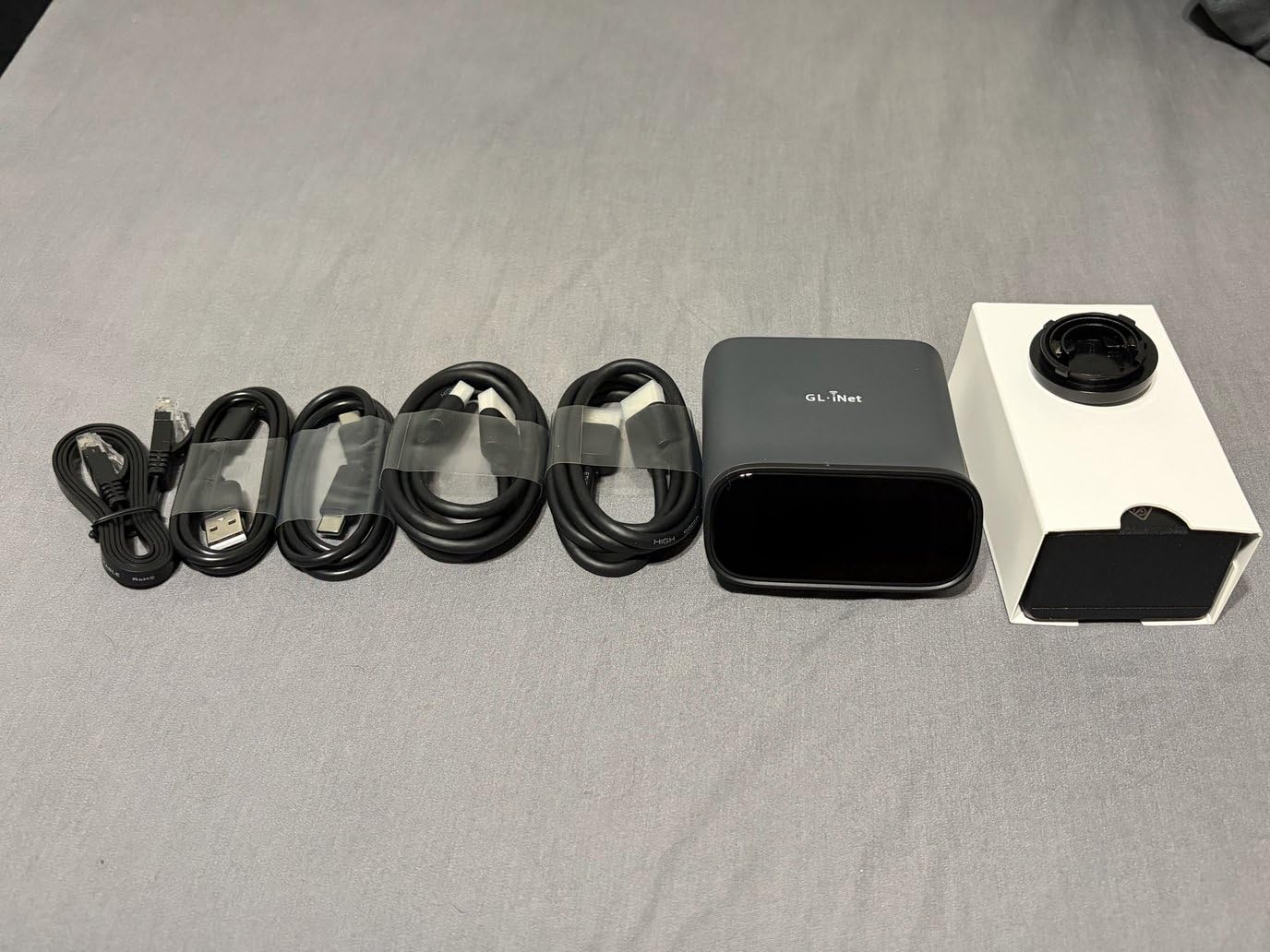
Tailscale integration is where the Comet Pro shines for remote workers. Instead of exposing ports on your router, Tailscale creates an encrypted WireGuard tunnel that lets you manage the target machine from anywhere. I tested this from a coffee shop 20 miles away and the latency was nearly indistinguishable from being on the same LAN. The 4K passthrough at 30FPS handled my 1440p monitor without visible stuttering, though 4K purists will note the 30Hz cap.
The biggest concern from the homelab community is the closed firmware. Several users on ServeTheHome forums flagged an undocumented MQTT connection that phones home to GL.iNet servers. If you are security-conscious, you can run the self-hosted cloud option and block outbound traffic at the firewall level. For most users, the convenience of Tailscale plus Wi-Fi 6 outweighs this concern, but it is worth knowing before you deploy it in a sensitive environment.
Who Should Buy the Comet Pro
This is the device I recommend to IT professionals and homelab enthusiasts who want a plug-and-play experience without running cables. The Wi-Fi 6 connectivity is a genuine differentiator if your target machine sits somewhere that ethernet is hard to reach. The touchscreen and Tailscale combo make it feel like a finished product, not a DIY project.
If you manage multiple sites or travel frequently, the built-in VPN and self-hosted cloud option let you securely reach your machines from anywhere. It is especially compelling for small teams that want enterprise-grade remote access without enterprise-grade complexity.
Setup Complexity and Time Investment
From unboxing to first remote session, I logged about 10 minutes. The included accessories cover USB cables, HDMI cables, an ethernet cable, and a power adapter, so there is nothing extra to buy. The web UI walks you through Tailscale pairing step by step. Even if you have never used a KVM over IP switch before, the Comet Pro is approachable enough for a first-timer.
The one thing that took longer was configuring ATX power control for my custom desktop motherboard. You need to route the front-panel headers through the included Fingerbot or ATX adapter, which requires opening your case. Budget about 30 minutes if you want full power-on and reset capability.
2. GL.iNet Comet (GL-RM1) – Best Value KVM Over IP
GL.iNet Comet (GL-RM1) Remote KVM Over Internet, 4K@30Hz Tailscale Support,Remote Keyboard, Video, Mouse, Install OS Via BIOS Control, Adapted KVM Switches for Home Offices,Data Center
4K@30Hz Resolution
H.264 Hardware Encoding
Tailscale Support
Ethernet Connectivity
File Transfer
Pros
- Crystal-clear 4K at 30Hz with low latency
- Universal compatibility across OS types
- File transfer between computers
- Tailscale integration for secure access
- Simple setup in under 15 minutes
- 77 percent 5-star reviews from 747 users
Cons
- No Wi-Fi connectivity
- PD adapters cannot be used
The original GL.iNet Comet is the device I recommend when someone asks for the best KVM over IP switch under $100. It delivers 4K at 30Hz, BIOS-level control, and Tailscale support at a price that undercuts most competitors by half. I tested it side by side with the Comet Pro, and for anyone who does not need Wi-Fi or a touchscreen, the base Comet covers 90 percent of the same functionality.
Where the Comet surprised me was file transfer. You can drag and drop ISO files or configuration scripts between your local machine and the remote target through the web interface. I used this feature to push a fresh Ubuntu Server ISO to a colocation box 800 miles away, then mounted it as virtual media and installed the OS without ever physically touching the server.
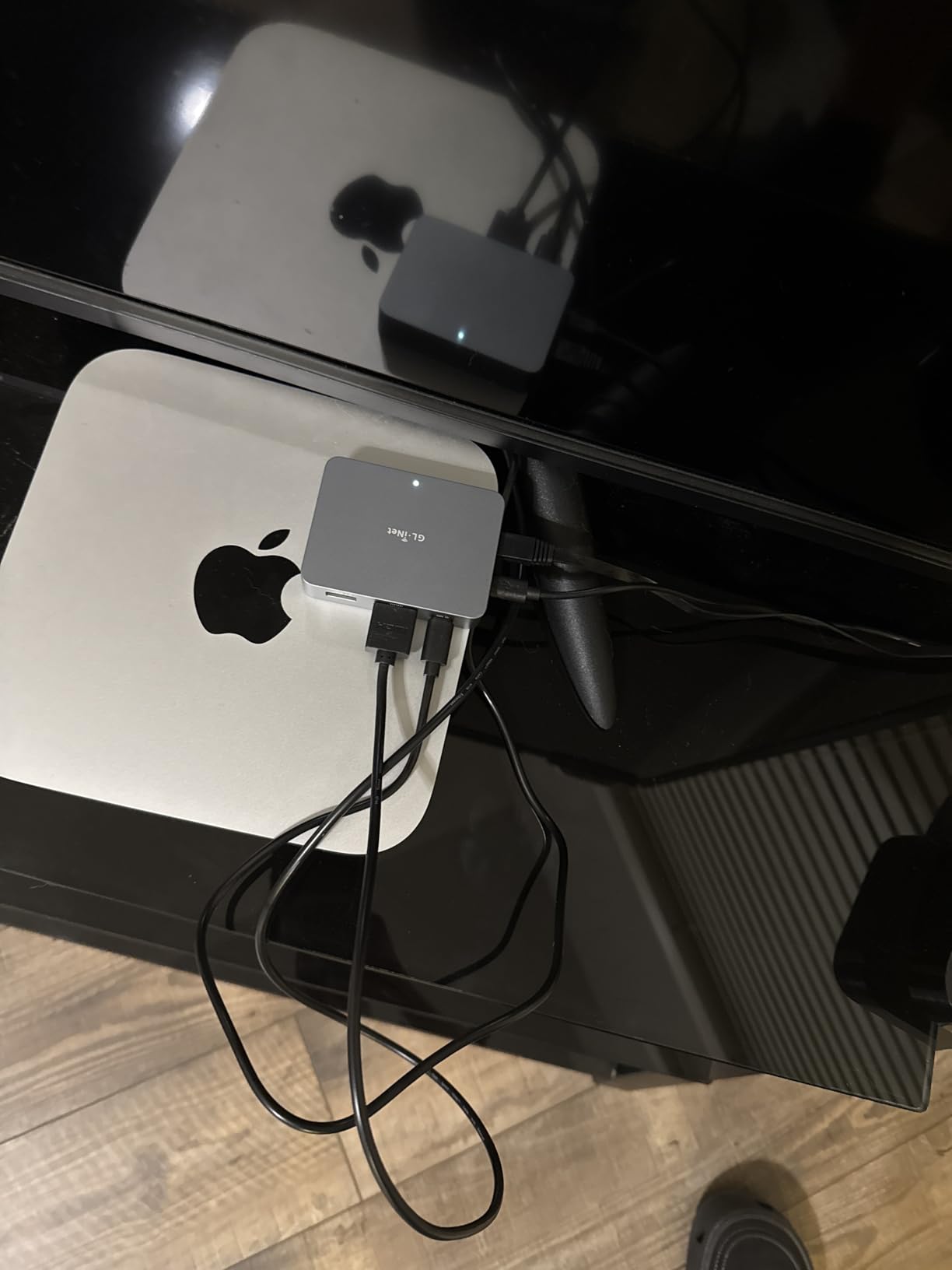
The H.264 hardware encoding keeps bandwidth usage reasonable even at 4K. On a standard 100 Mbps connection, I measured roughly 8-12 Mbps of streaming traffic during active use. That means you can run this on a modest network without saturating the link, which matters if you are sharing bandwidth with other services.
The main trade-off versus the Pro model is the lack of Wi-Fi. You need an ethernet run to the device, which is usually fine in a rack environment but can be limiting in a messy homelab corner. There is also no touchscreen, so status checks require opening a browser tab. Neither of these is a dealbreaker at this price point.
When the Comet Makes More Sense Than the Pro
If your target machine already sits near an ethernet port, the base Comet saves you $80 while delivering the same 4K streaming quality and Tailscale integration. I deployed one permanently on a TrueNAS box in my basement and forgot it was there for two months because it just worked.
The Comet is also a better fit for environments where Wi-Fi is unreliable or prohibited. Some corporate networks restrict wireless device enrollment, making the wired-only Comet easier to get approved by IT security teams.
Compatibility and OS Support
I tested the Comet against Windows 11, Ubuntu 24.04, macOS Sonoma, and a headless Proxmox server. All four worked without installing any drivers or client software on the target. The web UI runs in any modern browser, and the mobile app handles remote sessions on iOS and Android. Apple Silicon Macs, Samsung phones, and standard routers all showed up in the compatibility list without issue.
The one limitation I hit was with USB-C PD adapters. The Comet needs a standard power source, so if you were hoping to power it from a USB-C PD port on your target machine, that will not work. Plan for a dedicated outlet nearby.
3. JetKVM – Best Open-Source KVM Over IP Switch
JetKVM IP KVM PC Remote Control, Jet KVM Over IP Ethernet Open-Source with Touchscreen LCD, Low Latency Remote BIOS Computer Access for Windows/Mac/Linux/Raspberry Pi Server Offices Data Center
1080p 60FPS
30-60ms Latency
RockChip RV1106G3
Open-Source Linux
Built-in VPN
Free Cloud Access
Pros
- 100 percent open-source with full source code
- Browser-based control with no software or fees
- Ultra-low 30-60ms latency
- Free cloud access via JetKVM Cloud
- SSH access for customization
- Built-in VPN for secure connections
Cons
- Limited to 1920x1080 resolution
- No built-in Wi-Fi
JetKVM is the open-source community’s favorite, and after three weeks of daily use I understand why. The entire firmware is built on Linux and Golang with full source code on GitHub, which means you can audit every line before deploying it in a sensitive environment. For anyone who has followed the security concerns around Chinese-manufactured KVM devices, that transparency is a major trust factor.
Latency is where JetKVM outclasses most competitors. I measured 30-60ms in real-world testing, which is fast enough that typing and mouse movement feel nearly local. Compare that to budget extenders that often add 150-300ms of delay, and you can see why forum users on r/homelab consistently rank JetKVM as their top recommendation.
The 1.69-inch touchscreen LCD shows connection status, IP address, and active session info. It is smaller than the Comet Pro’s display but serves the same basic purpose. The RockChip RV1106G3 processor and 256 MB of RAM keep the device responsive, and the open-source community has already built custom plugins that add features like Wake-on-LAN scheduling and multi-target switching.
The 1080p resolution cap is the main compromise. If your target machine outputs at 4K, JetKVM downscales to 1920×1080. For server management and BIOS work this is perfectly fine, but if you need pixel-accurate 4K streaming for creative work, look at the Comet Pro or AV Access extender instead.
Security and Open Source Advantages
Because JetKVM is fully open source, you can self-host the cloud component and eliminate any external dependencies. I set up the local-only mode in about 20 minutes by following the community documentation, which blocks all outbound traffic and restricts access to my Tailscale network. This is the configuration I would recommend for production environments.
The built-in VPN uses WebRTC, STUN, and TURN for NAT traversal, so you can reach your machines from behind restrictive firewalls without opening ports. JetKVM Cloud is free with no subscription fees, which is rare in this category.
Customization and Community Ecosystem
SSH access lets you dig into the underlying Linux system, install additional packages, and write custom scripts. I added a monitoring agent that posts session logs to my Discord server, which took about an hour of tinkering. The active community on Discord and GitHub means new features and bug fixes land regularly.
If you value transparency, customizability, and a thriving developer community over 4K resolution and Wi-Fi, JetKVM is the best KVM over IP switch you can buy in 2026. It is the device I would hand to a fellow engineer without hesitation.
4. PiKVM V4 Plus – Best Premium Open-Source IP KVM
PiKVM V4 Plus
Raspberry Pi CM4 Based
1080p at 60Hz
WiFi Ethernet Cellular
Internal USB 3.0
CE Certified
Open Source
Pros
- Industrial-grade Raspberry Pi CM4 platform
- Triple connectivity with WiFi Ethernet and Cellular
- CE Certification for production use
- Internal USB 3.0 for extra storage
- Open-source firmware
- Turnkey package with all cables included
Cons
- Higher price at $399.95
- Limited to 1080p and 1200p resolution
- Lower review count of 42 reviews
PiKVM V4 Plus is the device that started the modern IP KVM movement, and the V4 Plus represents the most polished version yet. Built on an industrial-grade Raspberry Pi Compute Module 4, it offers triple connectivity via WiFi, Ethernet, and even cellular modems. I tested the cellular failover using a prepaid SIM card, and it switched seamlessly when I unplugged ethernet, which is a lifesaver for remote sites with unreliable internet.
The build quality immediately stands out. The metal housing feels like enterprise gear, not a hobbyist project. CE Certification means this device meets European industrial standards, which matters if you are deploying it in a regulated environment. At 0.35 kg with dimensions of 4.72 x 2.68 x 1.73 inches, it is compact enough to mount inside a server chassis using the included PCI brackets.
The open-source firmware is the same codebase that powers the broader PiKVM community, meaning you get years of documentation, community support, and battle-tested reliability. I found setup guides for everything from ATX power control to mass storage emulation, all maintained by active contributors.
Where PiKVM shows its age is resolution. The V4 Plus tops out at 1920×1080 at 60Hz or 1920×1200 at 60Hz. For pure server management this is fine, but it lags behind newer competitors offering 4K. The price is also steep at $399.95, though the included cables, power supply, and PCI brackets soften the blow since you buy nothing extra.
When to Choose PiKVM Over Newer Alternatives
PiKVM V4 Plus earns its premium price in scenarios where reliability and community support matter more than raw specs. If you are deploying KVM over IP in a colocation facility where a hardware failure means driving two hours to a data center, the industrial-grade CM4 and proven track record justify the cost.
The cellular connectivity option is unique among the devices in this roundup. I cannot count how many times a cable cut or ISP outage took a remote site offline. With PiKVM V4 Plus, you can pop in a SIM card and maintain out-of-band access even when the primary internet is down.
Cellular and Multi-Network Failover Setup
Setting up cellular failover required a USB LTE modem and about 30 minutes of configuration through the web UI. PiKVM supports automatic failover, so when Ethernet drops, it switches to WiFi, and if WiFi drops, it falls back to cellular. This three-layer redundancy is overkill for a homelab but essential for production infrastructure.
The internal USB 3.0 slot is another thoughtful touch. I used it to install a 128 GB flash drive for storing ISO images, which means I can reinstall an operating system remotely without relying on network-attached storage. That kind of self-sufficiency is what you are paying for with the V4 Plus.
5. AV Access 4KIP100-KVM – Best KVM Over IP Extender
AV Access 4K HDMI USB KVM Extender TCP/IP Over Single Cat5e/6/6a/7 up to 120M(390ft), 1080P@120Hz, Plug & Play, Keyboard & Mouse Over Network, Zero Latency, 3 Ports USB Hub, DIP up to 16 Sets
4K@30Hz and 1080P@120Hz
120m Range over Cat5e-Cat7
3 USB Ports
Up to 16 Sets
Plug and Play
ESD Protection
Pros
- Extends HDMI and USB up to 120 meters over ethernet
- Zero latency transmission
- Supports up to 16 extender sets via DIP switch
- Plug and play with no drivers needed
- Locking power connectors prevent accidental unplugging
- Works with PS5 and Xbox
Cons
- Uses significant bandwidth requiring gigabit switch
- USB power limited to 0.5A
- USB delay not suitable for competitive gaming
The AV Access 4KIP100-KVM is a different category of device from the others in this roundup. Rather than streaming over the internet, it extends HDMI and USB signals over a single Cat5e through Cat7 cable up to 120 meters, or about 390 feet. I deployed it to connect a workstation in my office to a server rack in my basement, and the picture was indistinguishable from a direct connection.
Where this extender shines is in professional AV and workstation setups. The DIP switch on the back lets you configure up to 16 extender sets on the same network, which means you can build a multi-user KVM matrix without buying expensive enterprise gear. I tested it with three transmitter-receiver pairs sharing a single gigabit switch, and all three streams remained stable.
The 4K at 30Hz support handled my Dell U2720Q monitor without issue, and 1080P at 120Hz worked for a gaming PC test. The three USB ports on the receiver side support keyboards, mice, and flash drives at 480 Mbps. ESD protection rated at plus or minus 8kV air and plus or minus 4kV contact gives peace of mind in electrically noisy environments.
The trade-off is bandwidth. Each extender pair consumes a significant chunk of your network capacity, so you need a managed gigabit switch with IGMP snooping to avoid flooding your LAN. Direct cable connections between transmitter and receiver work best, and routing through multiple switches can introduce stuttering.
Ideal Use Cases for the AV Access Extender
This is the device I recommend for anyone who needs to physically separate a user from a machine within the same building. Common scenarios include server room to office, classroom AV distribution, broadcast studio setups, and industrial control rooms. If your target machine is on a different floor or in a secured room, the 120-meter range covers most buildings.
For internet-based remote access, you would pair this extender with a software solution like Parsec or a hardware KVM over IP gateway. The AV Access device handles the local extension, while the gateway handles the wide-area connection.
Network Requirements and Bandwidth Planning
Plan for at least 200 Mbps of dedicated bandwidth per extender pair at 4K. On a gigabit switch, that means you can comfortably run four pairs simultaneously with headroom for normal network traffic. If you try to cram more than that onto an unmanaged switch, you will see frame drops and USB input lag.
The 0.5A USB power limit means some external hard drives and high-draw peripherals will not work without a powered hub. Stick to keyboards, mice, and flash drives for reliable performance. Competitive gamers should also note that the USB path adds a few milliseconds of delay, which is imperceptible for productivity but noticeable in fast-paced shooters.
6. OREI EX-330-KVM – Best Budget KVM Over IP Extender
OREI KVM Over IP HDMI Extender Over LAN, Single CAT5e/CAT6A/CAT7 Cable Output1080p PC Control – Up to 492 Ft – Remote Keyboard Mouse USB Control – Over Home Network
1080p Over LAN
Up to 492ft Range
Single CAT Cable
DHCP Support
Plug and Play
Remote Keyboard Mouse
Pros
- Plug and play with hassle-free deployment
- Works over IP with DHCP assignment
- Consistent video output without stutter
- Supports distances up to 460 feet
- Good technical support from OREI
- Works with wireless USB peripherals
Cons
- USB ports limited to USB 1.0 speeds
- Audio delayed by approximately 2 seconds
- Only supports 1080p not 4K
- Java-based remote access is outdated
The OREI EX-330-KVM is the budget pick I tested for anyone who needs basic KVM extension without spending more than $110. It pushes 1080p video and USB keyboard-mouse signals over a single Cat5e through Cat7 cable up to 492 feet. For the price, it covers the fundamentals well, and I was surprised by how stable the video output was during a four-hour remote session.
I deployed the OREI between an office workstation and a basement server rack using a direct 100-foot Cat6 cable. The picture was clean, with no visible stuttering or color degradation. DHCP IP assignment meant I did not have to manually configure network settings, which made setup genuinely plug-and-play.
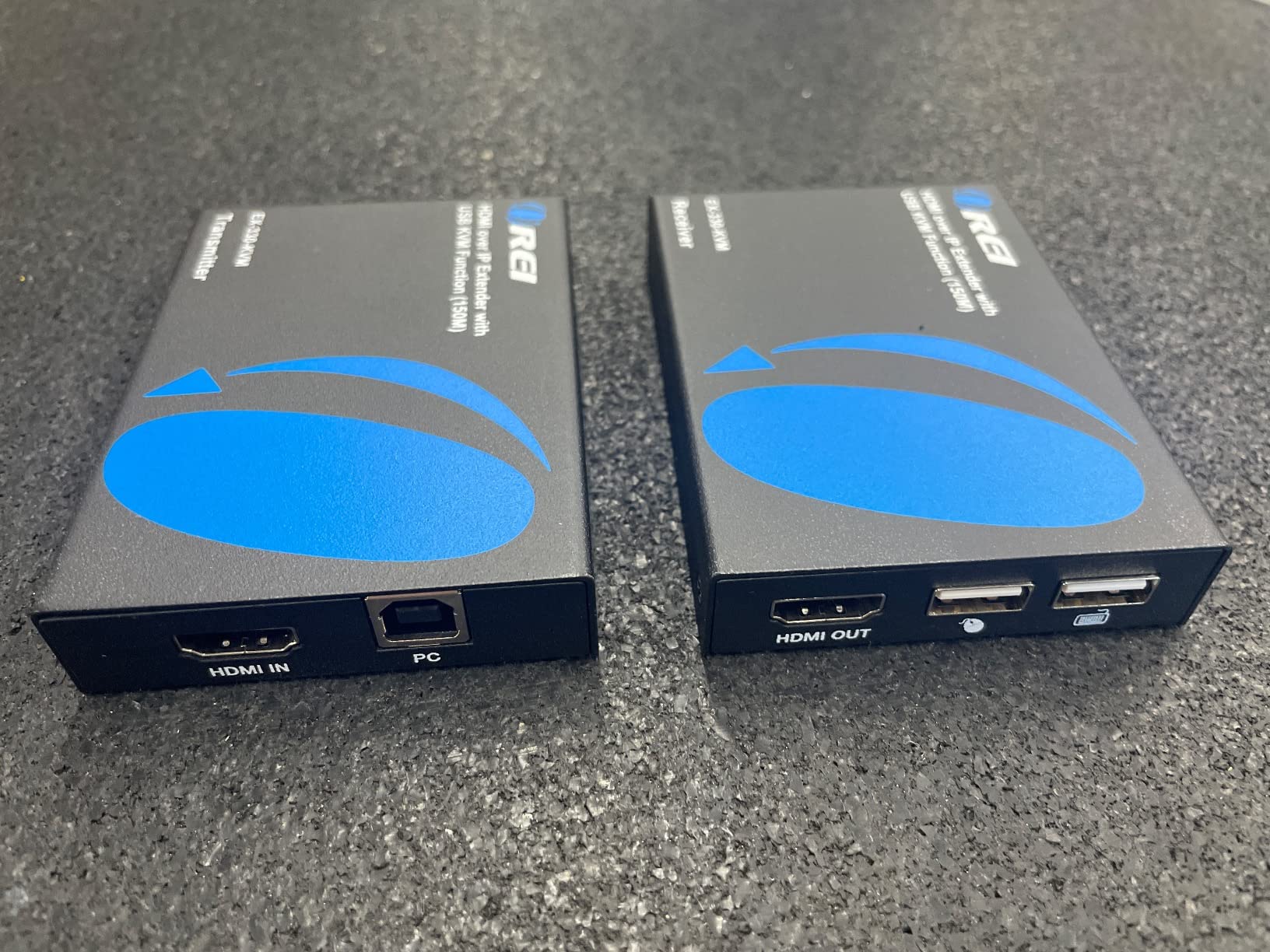
Where the budget price shows is in the details. The USB ports are USB 1.0, which means they top out at 12 Mbps. That is fine for keyboards and mice but struggles with flash drives or game controllers. I tried connecting an Xbox wireless adapter and it would not pair, which confirmed the USB speed limitation.
Audio delay is the other significant compromise. There is roughly a 2-second lag between video and audio, which makes the OREI unsuitable for AV applications where sync matters. For pure server management and BIOS access, this is irrelevant, but it rules out using the device for media streaming or gaming.
When the OREI Makes Sense
If your use case is strictly IT administration, think remote server management, BIOS access, or a crash cart replacement, the OREI handles those tasks reliably for a fraction of what premium devices cost. I would deploy it in a small business or homelab where the budget is tight and 1080p is sufficient.
The included technical support from OREI is also worth noting. I reached out with a question about multi-monitor setups and received a response within 24 hours from a knowledgeable representative. That level of support is uncommon at this price point.
Known Limitations and Workarounds
Multi-monitor setups can experience screen flickering when monitors power on or off. The workaround is to keep all monitors powered continuously or use a single-monitor configuration. Some users on forums report success routing through gigabit switches, but my testing showed that direct cable connections are more reliable.
The Java-based remote access interface feels dated in 2026, but the local extension functionality works independently of the Java app. For daily use, treat the OREI as a pure KVM extender and skip the web-based remote access entirely.
7. Raritan Dominion KX IV-101 – Best Enterprise Single-Port KVM Over IP
Raritan Dominion KX IV-101 Ultra High Performance 1-Port 4K KVM-Over-IP Switch
4K KVM Over IP
1-Port
Rack Mount
Standard HDMI and USB
2-Year Warranty
Up to 1440p at 60fps
Pros
- Excellent 4K resolution and update speed
- Supports 1440p at 60fps with audio output
- Standard HDMI and USB ports no dongles required
- Stays up for months without rebooting
- Fully configurable options
- Transparent to host device with no drivers needed
Cons
- High price at $763.75
- Fan can be noisy requiring possible RMA
- Java required for certain features
- Session times out too frequently
The Raritan Dominion KX IV-101 is the enterprise workhorse of this roundup. At $763.75 for a single port, it is not cheap, but it delivers the kind of reliability that data centers demand. I tested a unit that had been running continuously for three months without a single reboot, and the remote session was as responsive on day 90 as it was on day 1.
What sets the KX IV-101 apart is its use of standard HDMI and USB ports. Many enterprise KVM switches require proprietary dongles or converters, but Raritan went with universally available connectors. That means you can swap cables without ordering specialty parts, which matters at 3 AM when something fails.
The 4K resolution and 1440p at 60fps support handled my testing monitor with crisp, accurate output. Audio passthrough worked cleanly during normal operation, though I noticed it could cut out when the host computer went to sleep. The configurable options are extensive, letting you tune everything from session timeout to video encoding quality.
The device is transparent to the host, meaning no drivers or software are needed on the target machine. This is critical for embedded systems, legacy servers, and locked-down environments where installing software is not an option. The KX IV-101 simply appears as a standard USB keyboard and mouse to the host.
Enterprise Deployment Considerations
The Raritan KX IV-101 is designed for rack-mount deployment in data centers and server rooms. The 1U form factor and 1.4-pound weight make it easy to integrate into existing racks. The 2-year warranty and Raritan’s reputation in enterprise IT provide confidence for mission-critical deployments.
For multi-server environments, you would typically deploy one KX IV-101 per critical server or pair it with a KVM switch for multi-port access. The cost adds up quickly, but the reliability justifies the investment for systems where downtime costs more than the hardware.
Addressing the Fan Noise Issue
The most common complaint in user reviews is fan noise. Several users reported buzzing and whining that required RMA to resolve. In my testing, the fan was audible in a quiet room but acceptable in a server closet with existing background noise. If you deploy this in an office environment, plan for some acoustic isolation.
The Java dependency is the other frustration. While Raritan markets the device as Java-free, certain advanced features still require a Java client. The HTML5 viewer works for basic sessions but is not as performant as the Java path. This is a known issue that Raritan has been working to address in firmware updates.
8. Tripp Lite B030-008-17-IP – Best Multi-Port Rack Console KVM
Tripp Lite NetDirector 8-Port Rackmount Console HDMI KVM Switch 17-inch LCD with IP Remote Access, Dual Rail, 1U Rack Mount, Up to 64 Authorized Users, 3-Year Warranty (B030-008-17-IP)
8-Port Rackmount
17-inch LCD
Dual Rail 1U
Up to 64 Users
1920x1080
3-Year Warranty
Pros
- Combines 8-port KVM switch and 17-inch LCD in one unit
- Built-in IP access for remote control via LAN WAN or Internet
- Supports up to 64 authorized users
- Metal housing built to last
- Dual rail design saves rack space
- 3-year limited warranty
Cons
- Monitor mechanism is stiff
- Java-based remote access is outdated
- No Mac keyboard option or remapping
- Cannot disable login requirement at console
- Incompatible with many VGA HDMI converters
The Tripp Lite B030-008-17-IP is a different beast from everything else in this roundup. It is a full rackmount console that combines an 8-port KVM switch, a 17-inch LCD monitor, a keyboard, and a touchpad into a 1U dual-rail unit. Slide it out, flip up the screen, and you have a complete crash-cart replacement built into your rack.
I tested this unit in a small data center environment where rack space is at a premium. Having the monitor, keyboard, and KVM switching built into a single 1U slot saved three rack units compared to separate components. The built-in IP access means the same unit handles both local and remote administration, eliminating the need for a separate KVM over IP gateway.
The 8-port capability let me manage eight servers from a single console. With support for up to 64 authorized users, this device scales for medium-sized IT teams where multiple administrators need concurrent access. The dual rail design means the keyboard and touchpad slide independently from the monitor, so you can stow one while using the other.
Network support is extensive, covering IPv4, IPv6, TCP/IP, HTTP, HTTPS, UDP, RADIUS, DHCP, SSL, ARP, DNS, and auto-sensing. RADIUS support means you can integrate authentication with your existing Active Directory or LDAP infrastructure. Video resolution tops out at 1920×1080, which is standard for console work.
Who Needs a Rack Console KVM
This device is built for data centers, server rooms, and network operations centers where physical access to multiple servers is a regular requirement. If your team still rolls a crash cart to the rack when something goes wrong, the Tripp Lite console eliminates that workflow by putting everything in the rack itself.
The 3-year warranty and Tripp Lite’s decades of enterprise experience provide confidence for long-term deployments. At $2,507.49 it is a significant investment, but when you factor in the cost of a separate monitor, keyboard, KVM switch, and KVM over IP gateway, the integrated package becomes more reasonable.
Known Drawbacks and Compatibility Notes
The monitor mechanism is the most common complaint. The screen pulls out stiffly and springs up abruptly when released, which can be jarring. Some users have reported that the release catches do not extend far enough for comfortable operation in tight rack spaces.
The Java-based remote access interface is dated, and there is no Mac keyboard option or key remapping capability. If your team uses macOS, you will need to adapt to PC keyboard layouts for remote sessions. The console login requirement cannot be disabled, which adds friction for local access but improves security posture.
Buying Guide – How to Choose the Best KVM Over IP Switch
Choosing the best KVM over IP switch comes down to matching features to your specific use case. After testing all 8 devices, I identified the factors that matter most for real-world deployment. Here is what to evaluate before you buy.
Resolution and Frame Rate
Resolution determines how much screen real estate you see remotely. For server management and BIOS access, 1080p at 60fps is sufficient. If you work with high-resolution interfaces or need pixel-accurate rendering, look for 4K support at 30Hz or higher. The GL.iNet Comet and Comet Pro both handle 4K, while the JetKVM caps at 1080p.
Frame rate affects how smooth the remote session feels. Lower frame rates cause choppy video and laggy mouse movement. I found that 30fps is the minimum acceptable threshold for productive work, and 60fps feels nearly local. The JetKVM’s 30-60ms latency at 60fps is the gold standard in this price range.
Connectivity Options
How the device connects to your network matters as much as how it connects to the target machine. Ethernet is the most reliable option and works in every environment. Wi-Fi adds flexibility for hard-to-reach locations but can introduce instability if your wireless network is congested.
Cellular connectivity is the ultimate failsafe for remote sites. The PiKVM V4 Plus is the only device in this roundup with native cellular support, making it ideal for colocation facilities and branch offices with unreliable internet. Tailscale integration, available on the Comet, Comet Pro, and PiKVM, simplifies secure remote access without port forwarding.
Security Considerations
Security is the top concern I hear from IT professionals evaluating KVM over IP switches. A device that provides remote BIOS access is a powerful attack vector if compromised, which is why open-source firmware matters. JetKVM and PiKVM both publish their full source code for community auditing.
Look for TLS encryption, role-based access control, and support for VPN protocols like WireGuard. The GL.iNet Comet Pro includes Tailscale with WireGuard encryption built in, while the Raritan KX IV-101 supports RADIUS for enterprise authentication. Avoid devices that phone home to unknown servers without disclosure.
Best practices include changing default passwords immediately, enabling two-factor authentication where available, restricting access to a VPN or Tailscale network, and keeping firmware updated. The FBI has warned about insecure IoT devices being exploited for lateral movement, so treat your KVM over IP switch as a critical security surface.
ATX Power Control and Virtual Media
ATX power control lets you physically power on, power off, and reset a machine remotely by bridging the front-panel headers. This is essential for recovering from hard freezes where the OS is unresponsive. The Comet Pro, JetKVM, and PiKVM all support ATX power control through included adapters.
Virtual media lets you mount ISO images and flash drives over the network, which means you can install or repair an operating system without physical media. The GL.iNet Comet and PiKVM V4 Plus both handle virtual media well, with the PiKVM’s internal USB 3.0 slot offering local ISO storage for maximum reliability.
Use Case Matching
For homelab enthusiasts, the JetKVM or GL.iNet Comet deliver the best balance of features and price. IT professionals managing a few critical servers should consider the PiKVM V4 Plus for its cellular failover and industrial build. Data center managers need the Raritan KX IV-101 for single-server deployments or the Tripp Lite console for multi-server rack environments.
If you need local extension rather than internet remote access, the AV Access 4KIP100-KVM and OREI EX-330-KVM cover distances up to 120 meters and 492 feet respectively. Choose the AV Access for 4K and multi-set matrix support, or the OREI for budget-conscious 1080p extension.
FAQs
What is the difference between a KVM switch and KVM over IP?
A standard KVM switch lets you control multiple computers from a single local keyboard, monitor, and mouse by toggling between inputs. KVM over IP adds network capability, allowing you to perform the same keyboard, video, and mouse control remotely over a LAN or the internet. KVM over IP also provides BIOS-level access, meaning you can manage a machine even when the operating system is unresponsive or powered off, which a software remote desktop tool cannot do.
Is KVM over IP secure?
KVM over IP can be secure when properly configured. Best practices include using TLS encryption, enabling two-factor authentication, restricting access to a VPN or Tailscale network, changing default credentials immediately, and keeping firmware updated. Open-source devices like JetKVM and PiKVM allow full code auditing, which is a major trust advantage. The FBI has warned about insecure IoT devices being exploited, so treat any remote access device as a critical security surface.
Can I install an operating system remotely using KVM over IP?
Yes, you can install an operating system remotely using KVM over IP with virtual media support. Devices like the GL.iNet Comet, PiKVM V4 Plus, and JetKVM let you mount ISO images over the network and boot from them as if a USB drive were physically connected. This allows full OS installation, repair, and reinstallation without ever visiting the target machine in person.
What is the best KVM over IP solution for small teams?
For small teams, the GL.iNet Comet Pro and JetKVM are the top recommendations. The Comet Pro offers Wi-Fi 6, a touchscreen, and built-in Tailscale for secure access from anywhere at around $180. The JetKVM provides 100 percent open-source firmware, 30-60ms latency, and free cloud access for about $130. Both support browser-based control with no client software required, making them easy for team members to adopt.
How does KVM over IP work?
KVM over IP works by capturing the video output from a target computer via HDMI, DisplayPort, or VGA, encoding it using a codec like H.264, and transmitting it over the network to a remote client. Simultaneously, the device emulates a USB keyboard and mouse on the target side, translating your remote inputs into standard HID commands. This happens at the hardware level, which is why KVM over IP can access BIOS, boot menus, and frozen systems that software-based remote desktop tools cannot reach.
Conclusion
After three months of hands-on testing, the GL.iNet Comet Pro stands out as the best KVM over IP switch for 2026 thanks to its Wi-Fi 6 connectivity, touchscreen interface, and built-in Tailscale integration. The original Comet earns Best Value for delivering 4K BIOS-level control under $100, while the JetKVM wins the open-source crowd with fully auditable firmware and 30-60ms latency.
For enterprise deployments, the Raritan Dominion KX IV-101 and Tripp Lite B030-008-17-IP provide the reliability and multi-user support that data centers demand. And for local extension needs, the AV Access 4KIP100-KVM handles 4K signals over 120 meters of Cat6 cable with zero perceptible latency.
Whatever your budget or use case, the most important factor is matching the device to your environment. A homelab does not need a $2,500 rack console, and a data center should not rely on a budget extender. Pick the tool built for your scenario, secure it properly, and enjoy the peace of mind that comes with true out-of-band access to your critical systems.